
A small business does not need to win an AI benchmark. It needs supplier quotes entered correctly, support replies grounded in its own policies, and changes to its internal tools that someone can maintain.
Strata makes a new option worth testing: running a large Qwen model on a consumer PC. The interesting question is whether that local system saves your team time and money compared with a smaller local model or a hosted service such as Claude Opus 5.5 or GPT-6.1 Sol.
Our approach is to start with cost per accepted task: include the time spent checking and correcting an answer, alongside the model bill. A cheap answer that creates ten minutes of rework can be an expensive answer.
Strata is the engine; Qwen is the model
Strata runs Qwen3.8-Flash-Next using supported NVIDIA or AMD hardware on Windows or Linux. It caches frequently needed experts on the GPU, keeps expert weights in system RAM, and uses the CPU for experts outside that cache. An approximately 28.8 GB lookup table stays on the SSD. Project overview, how the engine works.

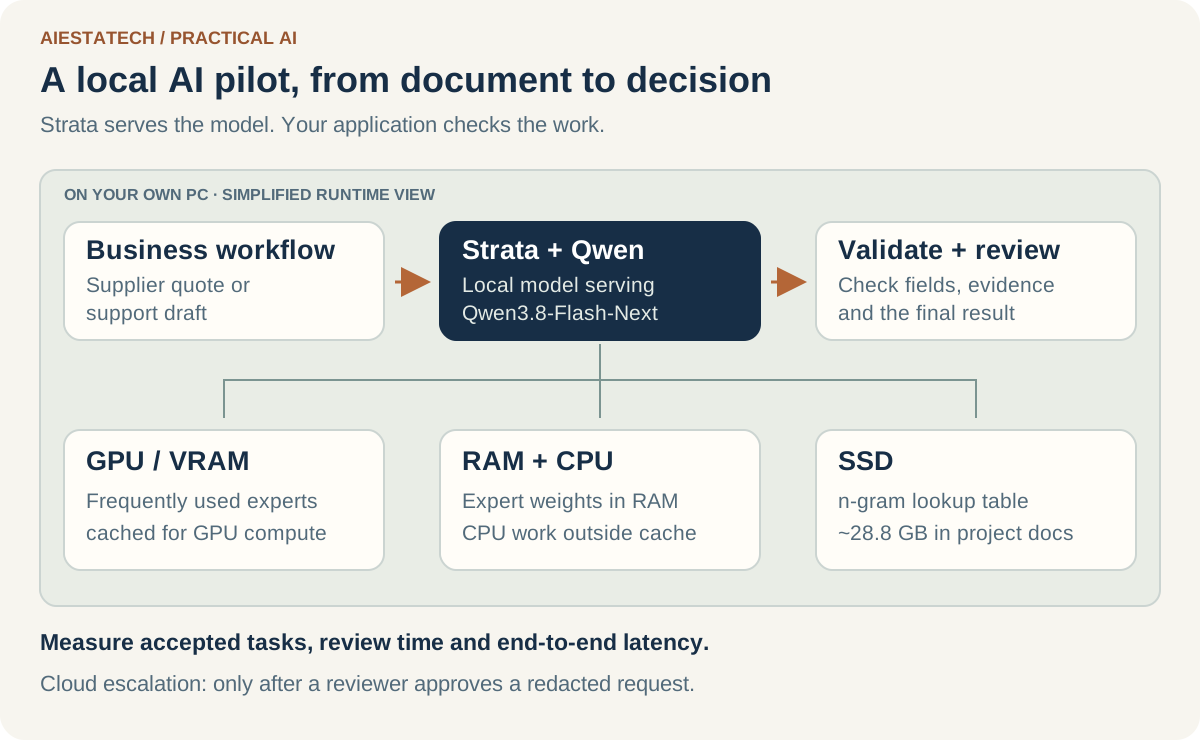
That distinction matters in a comparison. Strata is a way to serve a model; its speed depends on the hardware and configuration. The base model’s published accuracy figures are a separate measurement. A quantized Strata installation needs its own evaluation before you treat those figures as its results.
Qwen3.8-27B is a different, dense model. The official Flash-Next card lists 125B model parameters with 6B activated, plus separate n-gram and prediction components. The 27B card describes a dense 27B language model. “Larger” therefore does not mean the same memory or computation pattern. Flash-Next model card, 27B model card.
Four options, compared on business constraints
| Decision factor | Strata + Qwen3.8-Flash-Next | Qwen3.8-27B, self-hosted | Claude Opus 5.5 API | GPT-6.1 Sol API |
|---|---|---|---|---|
| Where inference runs | Your configured PC | Your configured server or PC | Hosted provider | Hosted provider |
| Published context specification | Base model: 262,144 native; local configuration may be smaller | 262,144 native | 1,000,000 | 1,050,000 |
| Standard input / output price per million tokens | No hosted token bill; hardware and operations still cost money | No hosted token bill; hardware and operations still cost money | $4 / $20 | $2 / $10 |
| What you maintain | Hardware, engine, model and integration | Serving stack, model, hardware and integration | Integration and provider usage | Integration and provider usage |
| License distinction | MIT engine; Qwen Community 1.0 base weights | Apache 2.0 model card | Provider service terms | Provider service terms |
Context sizes describe capacity, not dependable recall across that whole window. Both Qwen cards describe extension beyond their native context; that is also different from proving that your selected local configuration fits or performs well.
Sources: Strata license notes, Flash-Next, Qwen3.8-27B, Opus 5.5 specifications, GPT-6.1 Sol specifications. Prices checked on 8 October 2026; standard text-token rates exclude caching, tools, regional premiums, and other adjustments.
What the verified benchmark numbers actually show
Qwen’s own Hugging Face model cards provide a useful comparison between its two models. Here are selected reported scores:
| Evaluation | Qwen3.8-Flash-Next base model | Qwen3.8-27B | Opus 5.5 | GPT-6.1 Sol |
|---|---|---|---|---|
| SWE-bench Pro | 62.5 | 61.7 | — | — |
| CoWorkBench, office tasks | 73.9 | 70.7 | — | — |
| GPQA Diamond | 91.7 | 89.2 | — | — |
| IFBench, instruction following | 81.3 | 79.5 | — | — |
These are Qwen-reported base-model results, not measurements of Strata’s quantized runtime. Qwen documents its SWE-bench Pro harness and a refined task set; CoWorkBench is an in-house evaluation. That provenance belongs beside the numbers. Flash-Next evaluation table and methodology, 27B evaluation table.
A dash means we have not verified a directly comparable result for that exact model and evaluation. Qwen’s cards compare an older Opus 4.6 configuration. Anthropic’s Opus 5.5 launch uses evaluations including Terminal-Bench 4.0, while the 27B card includes Terminal Bench 2.1. Those versions cannot form a fair ranking. The reviewed GPT-6.1 Sol specification page supplies capabilities and pricing, rather than matching scores for this table. Opus 5.5 evaluation overview, GPT-6.1 Sol model page.
For SMB work, interpret the Qwen table as a reason to test both local options. A small gap on coding scores and a larger gap on office-work scores suggest different experiments; they do not establish which system will extract your invoices correctly.
Speed is a separate question
On an RTX 5070 with 12 GB VRAM, Ryzen 5 7600 and 64 GB RAM, Strata reports IQ2_XS output at 79 tokens/s for short chats and 63 tokens/s at 128K context. Q2_0 is reported at 94 and 76 respectively. These are project measurements; AIEstatech has not reproduced them. The project identifies different engine revisions for Q2_0 and the other rows. Model and speed guide, benchmark details.
Your staff experience more than generation speed. Measure the wait before the first useful output, document ingestion, cold starts, and two colleagues using the system at once.
An SMB cost example: local is not automatically cheaper
Consider a hypothetical team making 2,000 requests per month, each with 5,000 input tokens and 500 billed output tokens, including any billed reasoning output. That totals 10 million input and 1 million output tokens.
At the standard prices above, the arithmetic is:
- GPT-6.1 Sol: (10 × $2) + (1 × $10) = $30/month.
- Opus 5.5: (10 × $4) + (1 × $20) = $60/month.
This simplified example excludes cache effects, tool charges, retries, and discounts. It is a workload assumption, not a bill from an AIEstatech deployment.
A hypothetical local system might allocate a $900 hardware purchase over 24 months ($37.50), $6 in electricity, and two hours of maintenance valued at $30/hour ($60). Its allocated monthly cost is $103.50, before application development.
With an existing suitable machine and spare operator capacity, your incremental cost could be lower. If a local workflow avoids repeated manual work or keeps a suitable workload on your own infrastructure, that can be worth more than a token saving. The point is to put those assumptions into the decision.
Use this formula when reviewing the pilot:
Cost per accepted task =
(AI charges + allocated infrastructure + review and rework)
÷ tasks accepted against your business rubric
For example, reject an extraction that invents a purchase-order number even if every other field is correct. Counting the task as “mostly right” hides the operational cost.
A practical pilot for a small business
Choose one workflow with a clear reviewer and a reversible output. Supplier-quote extraction, internal policy answers, or draft support replies are better starting points than an unattended action that changes customer records.
Build a 30-case evaluation pack from work you understand. Keep the same inputs and rubric across systems:
| Measure | How to check it | Why it matters |
|---|---|---|
| Accepted-task rate | Reviewer marks each result pass or fail against a written rubric | Measures usable work |
| Unsupported claims | Count facts that cannot be traced to the supplied material | Catches plausible inventions |
| Review time | Time the person checking and fixing each result | Reveals hidden labour |
| Latency | Record median and slow-tail end-to-end completion time | Shows the staff experience |
| Cost per accepted task | Include model, infrastructure and review costs | Connects quality to economics |
| Concurrent use | Repeat while a second user submits work | Checks whether the pilot scales to your team |
Record the exact model, quantization, engine revision, context limit, prompt, tools and reasoning setting. Preserve those settings with the results. Test missing fields, contradictory documents, poor scans and requests outside the workflow—not just clean examples.
A useful architecture to try is local extraction with controlled escalation. Validate required fields and supporting evidence before accepting the output. If a check fails, route the case to a reviewer; that reviewer can approve a redacted cloud request if your business allows it. A model’s own confidence score should not decide this route.
Local inference only keeps the inference step local. Connected tools, telemetry, logs and application integrations need their own data-handling decisions.
Hardware and setup: what to check before downloading
Strata’s introductory guidance calls for a supported GPU with at least 12 GB VRAM, 32 GB or more RAM, and about 80 GB free storage. The detailed installer documents additional space for prediction layers, vision, some AMD installations, and a Q2_0 expert copy on AVX-512 CPUs. Leave headroom rather than budgeting exactly 80 GB. Requirements, detailed installation guide.
The project usually points a 32 GB machine toward Coder, with other low-RAM options on a larger GPU. With 48 GB it suggests IQ2_XS or Q2_0; 64 GB gives more options. Coder removes half the experts, selected around coding, with weaker general-purpose and non-English performance described by the project. RAM and model choices.
To try it:
git clone https://github.com/Niko1221/Strata.git
cd Strata
Run START-HERE.bat on Windows, or ./setup.sh on Linux. Follow the installer’s model, context and vision prompts. The local interface opens at http://127.0.0.1:8080; the first model load can make the PC sluggish while RAM is allocated. Installation instructions.
For an SMB, the next decision is small: can this configuration complete one useful workflow with an acceptable review burden? That pilot gives you stronger evidence than choosing a model from a leaderboard alone.
Sources checked on 8 October 2026. Strata documentation is pinned to revision 6674a0065fb9. This article contains original planning guidance, published third-party measurements, and labelled hypothetical costs; it does not claim AIEstatech ran these models in a comparative benchmark.
Read our earlier Qwen3.6 local inference notes, or discuss an AI/ML pilot with AIEstatech.
Try your own monthly cost comparison
Change the workload and your local operating-cost assumption. This calculation stays in your browser.
Standard rates checked 8 October 2026: Sol $2 input / $10 output and Opus $4 / $20 per million tokens. Output should include billed reasoning. Excludes cache effects, tool fees, retries, discounts, taxes and premium modes. Input is capped at 272K per request to stay within Sol’s standard pricing band; this is a cost illustration, not a quality or capacity comparison. Sources: OpenAI, Anthropic.